

Privacy & Data Hygiene
Know what tools remember, what not to upload, and how to handle work data responsibly.
31 stories (22 articles · 9 videos)
Start here
A few good first pieces before you browse the full feed.
 7 min read
Privacy 101: what ChatGPT remembers, sees, and shares
Separate training, memory, storage, and third-party sharing. Check the controls that affect your account without treating Temporary Chat or a paid plan as permission to share sensitive data.
New to AI 8 min read
Privacy and data hygiene when using AI at work
A practical guide to reducing privacy and confidentiality risk when using AI at work. Check the exact product, plan, configuration, data, and applicable rules before you paste.
Beginner 10 min read
Connecting AI to your email, calendar, and CRM safely
A risk-based guide to connecting AI with email, calendar, and CRM using minimum scope, approval gates, protected audit evidence, negative tests, and recovery paths.
IntermediateMore in this topic
 8 min read
Hermes Agent first week: memory hygiene, skills, and tool approvals
A safe first-week setup for Hermes Agent: install and smoke-test, curate MEMORY.md and USER.md, add one skill, bound file writes, and disable or isolate shell access.
Intermediate 8 min read
Call vLLM and other OpenAI-compatible endpoints from n8n
Call a local OpenAI-compatible /v1/chat/completions endpoint from n8n’s HTTP Request node, with explicit authentication, timeout budgets, base URL checks, and a private network boundary.
Intermediate 8 min read
OpenClaw allowlists, pairing, and group mention security
Channel allowlists, DM pairing, and group mention rules are the real security boundary for OpenClaw — because tools can include shell, files, and browser. A practical lockdown checklist.
Intermediate 6 min read
Do not paste bank statements into AI
Account numbers, balances, counterparties, and payroll lines are paste bans for consumer AI. How to get literacy help from a model using typed, redacted fields - without uploading full statements, screenshots, or PDF exports.
New to AI 6 min read
Home photos and floorplans: privacy before you upload
Uploading interiors and floorplans to consumer AI can leak layout, valuables, kids' rooms, and security cues. A privacy-first checklist for what to redact, what to keep offline, and how to still get planning help without broadcasting your house.
New to AI 5 min read
Solo AI rules for client work
Before you put a client's brief, draft, or data near a consumer AI tool, write a one-page personal policy card: what you will never paste, what needs client consent, what you still price and scope yourself, and when you escalate to a human specialist. Freelancers do not inherit an employer AI policy - you need your own.
New to AI 7 min read
A caregiving handoff that preserves dignity and context
When care shifts between family members, shifts, or a new paid caregiver, what usually transfers is a list of tasks and a rushed verbal summary. A handoff template carries the cared-for person's own preferences forward too - without AI turning them into behavioural labels.
Beginner 8 min read
Chronic-condition administration: build a care calendar, not a treatment plan
A care-operations board can coordinate appointments, refill requests, forms, transport, and follow-ups while preserving care-team instructions and escalating every clinical question to a qualified professional.
Intermediate 7 min read
Get consent before you AI-edit or share someone's photo
Uploading a friend's photo to an AI tool to remove a background, swap a smile, or turn it into an illustration feels like a small, personal edit. For the person in the photo, it can be a much bigger decision they never got to make.
Beginner 6 min read
Finding subscription drift without exposing your bank history
Review a locally redacted transaction export for recurring charges and drift, without ever connecting an AI tool to your bank account. You leave with a confidence-flagged merchant list and a cancellation checklist a human actually executes.
Beginner 7 min read
Understand a medical document without turning it into medical advice
Use the original document, official glossaries and a four-column worksheet to prepare questions. Keep identifiable records out of public AI tools and interpretation with the care team.
Beginner 7 min read
Coordinating an ageing parent's care without losing their voice
When siblings start coordinating a parent's care, information sprawls across group chats, and the person it's about gets talked over. A consent-aware record — what to share, with whom, and a strict line between emergency and administrative information — keeps the coordination practical and keeps your parent's voice in the decisions.
Beginner 7 min read
Is this AI product safe for my child's data? A privacy checklist
A seven-point screen for age rules, collection, retention, training, sharing, controls and deletion that records unresolved child-data risks without pretending to certify a product as safe or lawful.
Beginner 7 min read
Archiving family photos and stories without inventing history
A consent- and provenance-aware workflow for drafting family-archive transcriptions and captions while keeping model inferences separate from confirmed history and children's data out of unapproved tools.
Intermediate 9 min read
A personal knowledge system that helps you retrieve, not hoard
A bounded capture-to-retrieval system with explicit use cases, retrieval tests, review dates, deletion rules, and warnings about sensitive notes, other people's data, and provider-held accounts.
Intermediate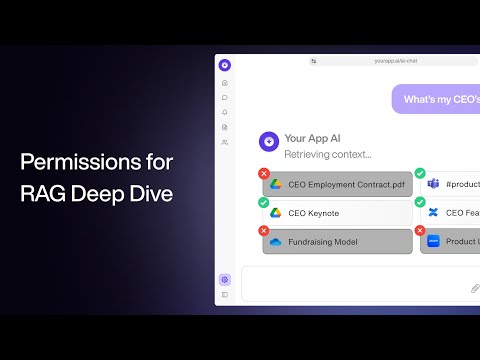 20 minutes
Permissions & Access Control for RAG - a Deep Dive Tutorial
Paragon. Walks through the production RAG permission problem and compares tool-calling, namespaces, ACL tables and relationship-based permissions. That directly supports the article's core rule: retrieval must only return sources the current user is allowed to see, and source-system permissions cannot be treated as an afterthought.
Advanced 10 min read
Company knowledge RAG: permissions, leakage, and source boundaries
A company knowledge assistant is only safe if retrieval respects permissions. How to design RAG source boundaries, ACL filtering, document ownership, logging, stale-source handling, and refusal behavior.
Advanced 9 min read
EU AI Act for SMEs: a practical governance plan
The EU AI Act is not just a legal problem for large vendors. A practical SME plan for inventory, risk classification, human oversight, transparency, vendor records, and rollout discipline.
Advanced 10 min read
Local AI on your Mac: Ollama, LM Studio, and what 7B models can really do
Running AI locally has matured. With Ollama or LM Studio and a modern Mac, you can run capable models offline, free, and private. What works, what doesn't, and the use cases that actually benefit.
Intermediate 6 min read
Sharing images with AI: what you can (and shouldn't) upload
Modern AI can read photos, charts, screenshots, and handwriting almost as easily as text. A practical guide to what works, what doesn't, and the thirty-second privacy checklist before you upload anything.
New to AI 25 minutes
OWASP's Top 10 Ways to Attack LLMs: AI Vulnerabilities Exposed
IBM Technology. Zooms out from prompt injection to the wider OWASP Top 10 for LLMs — insecure output handling, sensitive information disclosure, excessive agency — which is exactly the failure-mode catalogue you want in mind before you grant Gmail or HubSpot scopes to anything.
Intermediate 11 minutes
What Is a Prompt Injection Attack?
IBM Technology. Jeff Crume's "buy an SUV for $1" example is the cleanest 10-minute explanation of why direct and indirect prompt injection are different problems, and why filtering can't fully solve either. It pairs directly with the article's argument that you need least-privilege scopes, a dedicated agent account, and a human in the loop on anything irreversible — not a cleverer system prompt.
Intermediate 14 minutes
Learn Ollama in 15 Minutes - Run LLM Models Locally for FREE
Tech With Tim. A tight, no-nonsense Ollama walkthrough — install, pull a model, chat, then poke at the local HTTP API from Python and create a custom model with a Modelfile. Covers exactly the workflow the article describes for daily use on a Mac, including how to think about model size vs. your machine's RAM.
Intermediate 6 minutes
LM Studio Tutorial: Run Large Language Models (LLM) on Your Laptop
Kevin Stratvert. Same workflow as Ollama but in a GUI: download LM Studio, pull a Llama or Gemma model, chat, drop a PDF in and ask questions about it. Good for readers who'd rather not live in the terminal — also useful for getting a feel for how a 1B–3B model actually performs against a heavier one.
Intermediate 93 minutes
Sam Altman | This Past Weekend w/ Theo Von #599
Theo Von. The section roughly twelve minutes in, where Altman admits there is no legal privilege for ChatGPT conversations and that OpenAI can be ordered to hand them over in a lawsuit, is the single most-quoted piece of footage on this topic — and worth hearing in his own voice rather than via a news clip. The rest of the conversation is wide-ranging, but that one exchange is the honest answer to the question the article asks: "what does the company actually do with what I type?"
New to AI 13 minutes
How to Secure AI Business Models
IBM Technology. Jeff Crume's lightboard explainer of the three places generative AI introduces risk — the data, the model, and the usage — and what good controls look like for each. Useful for the article's argument that "be careful" isn't enough; you need to think about which category of risk you're actually exposed to as an employee.
Beginner 11 minutes
What is Shadow AI? The Dark Horse of Cybersecurity Threats
IBM Technology. Sits below our usual 100K bar but earns the slot because it's the single best short explanation of why an employee using a personal ChatGPT account on work problems is the actual risk most companies face. Crume's "don't say no, say how" framing is the same posture the article takes — you're not trying to ban AI, you're trying to make safe use the easy default.
Beginner 4 minutes
Live demo of GPT-4o vision capabilities
OpenAI. Four minutes of someone holding up a handwritten linear equation to the camera and ChatGPT tutoring them through it without giving the answer. It is the clearest, shortest demo of "the model can actually see what I'm showing it" and frames the use cases the article recommends — handwritten notes, simple math, captured documents — better than any walkthrough we found.
New to AI