An email draft is useful when it says what you mean without adding a promise, excuse or private fact. Start with a small facts card, ask for one or two versions, then inspect the chosen wording before sending.
Build a facts card before the prompt
For a real message, first confirm that the exact tool, account and purpose are approved for the material. Keep private threads and unnecessary identifiers out. Removing names does not necessarily remove client confidentiality. If authorization is unclear, use a fictional scenario and adapt the structure privately.
Data controls and Temporary Chat describe different settings; neither grants permission to disclose correspondence. Check your workplace or client rules before sharing it.
For this fictional exercise, the facts card is:
| Field | Supplied fact |
|---|---|
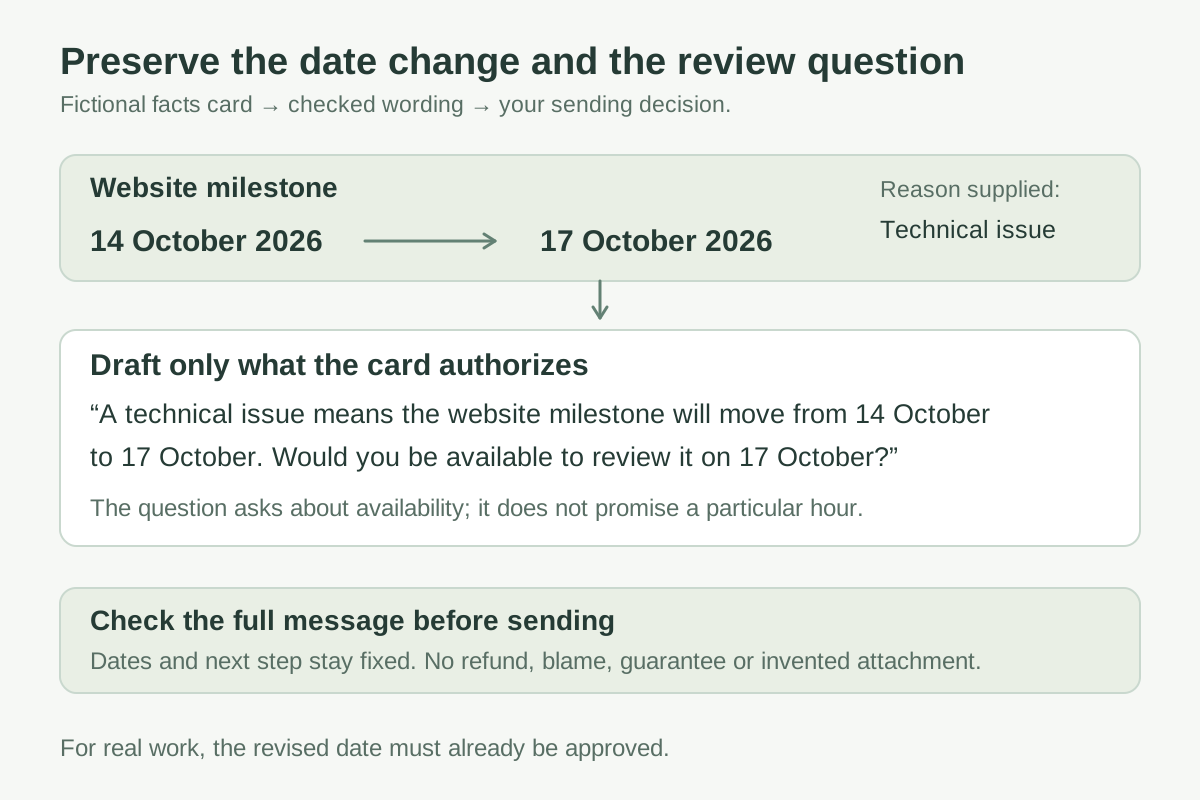
| Purpose | Tell a client that a website milestone has moved |
| Original date | 14 October 2026 |
| Revised date | 17 October 2026 |
| Reason | A technical issue |
| Next step | Ask whether a review on 17 October is possible |
| Must not add | A refund, guaranteed completion time, blame or an attachment |
Draft a calm email under 90 words from this fictional facts card. State the changed date near the beginning. Ask about the review. Do not invent facts or commitments. Give one direct version and one warmer version.
Inspect a complete draft
One direct version, an AI-generated teaching example checked against the card rather than recorded from a product session:
Subject: Website milestone moved to 17 October
Hi Alex,
A technical issue means the website milestone will move from 14 October to 17 October. Would you be available to review it on 17 October? Please let me know if that date does not work, and we can discuss the review arrangements.
Thanks, Sam
Alex and Sam are fictional placeholders. The message preserves both dates and asks about availability. It does not promise a particular hour or compensation. “We can discuss” leaves the arrangements open; “We guarantee delivery by noon” would add an unauthorized commitment.
For a real project, the revised date itself must already be approved. The model’s ability to phrase it does not establish that the team can meet it.
Revise the exact problem
If the draft is too formal, identify the line rather than asking for an entirely different email:
Keep the subject and dates unchanged. Replace the whole sentence “Please let me know if that date does not work, and we can discuss the review arrangements” with a shorter question. Do not change the commitment or add an apology.
One possible edit is “Would another review date suit you better?” Compare it with the intended next step. If that invites more flexibility than you can offer, keep the original. Tone is a practical relationship choice, not a contest to sound least like AI.
OpenAI’s prompting guidance supports clear instructions and iterative refinement. It does not establish how the recipient will react.
Keep ordinary politeness when it earns its place
“I hope you’re well” may fit a relationship. “Thanks for your patience” may acknowledge real inconvenience. Remove a phrase when it delays the point, sounds unlike you, or claims a feeling you do not mean. These phrases are not proof of AI authorship.
Ask for quoted suggestions if you want help finding unnecessary wording. Reject an edit that removes a necessary qualification just to make the email shorter.
Before sending, compare every name, date, number and commitment with your records. Check recipients and attachments in the actual email app. For consequential employment, legal or contractual messages, follow the relevant review process; a draft does not settle the underlying decision.
Save the structure, not the thread
Use the email drafting card for recurring messages. Save the prompt’s purpose, protected facts and review checks, then supply fresh approved facts next time.
If you store preferences in custom instructions or memory, keep them general. “Use short paragraphs” is a reusable preference. A client’s deadline or private correspondence belongs in the appropriate authorized record, not a universal writing preference.