
OpenClaw’s useful features are exactly why the security model matters. The Gateway can connect messaging channels to an agent that may run shell commands, read and write files, drive a browser, and send messages. A basic but high-impact failure path is an untrusted or compromised sender reaching an over-privileged agent; the controls below reduce that exposure alongside conventional host, dependency, credential, and network security.
OpenClaw’s own ordering is the right one (security docs):
- Identity first: who can talk to the bot (DM pairing / allowlists / explicit open).
- Scope next: where it can act (groups, tools, sandbox, device permissions).
- Model last: assume the model can be manipulated; limit blast radius.
This article assumes you already installed the gateway (personal gateway setup).
dmPolicy="open"andgroupPolicy="open"are last-resort settings. Prefer pairing and allowlists unless you fully trust every participant who can reach the bot. Tool-enabled open DMs are a public remote-control surface.
Every approved sender can become a path into whatever the agent can read: mail, files, browser sessions, customer data in tools. Approve people the way you would approve SSH keys, sparingly, revocably, and with a named reason.
Trust model in one paragraph
OpenClaw documents a personal assistant trust model: one trusted operator boundary per gateway. It is not a hostile multi-tenant boundary. If mutually untrusted users can message one tool-enabled agent, they share that agent’s delegated authority. Split gateways (and ideally OS users/hosts) when trust boundaries differ.
Authenticated Gateway access is operator-level. sessionKey is a routing selector, not an authorisation token. Do not invent a false sense of per-user tenancy on a shared personal gateway.
DM access: pairing, allowlist, open, disabled
Channels implementing this access model expose the following policies; check the specific channel’s current defaults and exceptions:
| Policy | Behaviour |
|---|---|
pairing | Default. Unknown senders get a pairing code; ignored until approved. Codes expire (documented as 1 hour). |
allowlist | Unknown senders blocked; no pairing handshake. |
open | Anyone can DM; requires explicit allowlist opt-in including "*". |
disabled | Inbound DMs ignored. |
Approve deliberately:
openclaw pairing list <channel>
openclaw pairing approve <channel> <code>
Details: pairing.
Practical rule for personal use: keep pairing or strict allowlist. Approve only your own accounts and, at most, a tiny set of co-operators who share the trust boundary.
Two allowlist layers
1. DM allowlist (allowFrom / channel-specific equivalents)
Who may DM the bot. Current OpenClaw stores pending and approved sender rows in ~/.openclaw/state/openclaw.sqlite, keyed by channel and account. Older credential JSON files are legacy migration inputs, not the current authorization source (pairing state documentation). Treat the SQLite file as sensitive authorization state and back it up consistently with the gateway state.
2. Group allowlist
Which groups/channels/guilds the bot accepts at all; plus who may trigger it inside a group (groupPolicy="allowlist" + groupAllowFrom on supported channels).
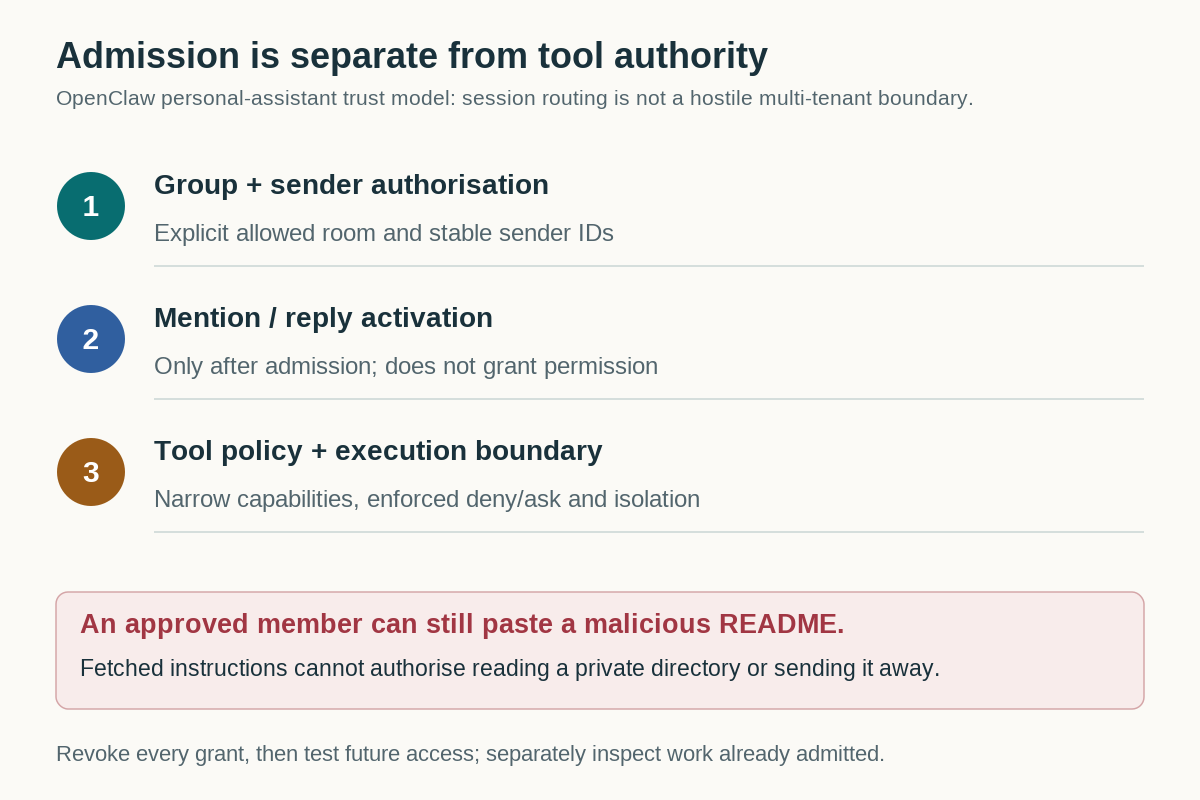
Check order matters: group policy/allowlists first, then mention/reply activation. Replying to a bot message does not bypass groupAllowFrom.
Example shape (adapt stable sender IDs and agent naming to the current channel schema):
{
  channels: {
    whatsapp: {
      dmPolicy: 'allowlist',
      allowFrom: ['+15555550123'],
      groupPolicy: 'allowlist',
      groupAllowFrom: ['+15555550123'],
      groups: { '<approved-group-id>': { requireMention: true } },
    },
  },
  agents: {
    entries: { main: { default: true, groupChat: { mentionPatterns: ['@openclaw'] } } },
  },
}
Customise mention patterns so requireMention matches your bot names, not a generic string everyone types by accident.
Group mentions are a safety control
In busy groups, an always-listening agent will:
- Burn tokens on noise
- Act on prompt injection buried in jokes, pasted logs, or linked pages
- Leak context across people who share a room but not a trust boundary
Require mention (or equivalent activation) unless the room is a dedicated agent channel with a locked membership list.
Even with mention gating, untrusted content the bot fetches (web pages, attachments, emails) can carry instructions. Prompt injection is not solved by system prompts. Hard controls are tool policy, approvals, sandboxing, and who can talk to the bot at all.
Prompt injection does not require public DMs. If only you can message the bot but the bot reads the open web or shared inboxes, adversarial text can still arrive inside tool results.
Session isolation for multi-person DMs
Default behaviour can route DMs into a main session for continuity. If more than one person can DM the bot, isolate sessions:
{ session: { dmScope: 'per-channel-peer' } }
Without isolation, one person’s context can bleed into another’s turn. That is both a privacy bug and a prompt-injection amplifier.
Network exposure
Before you celebrate remote chat:
- Prefer
gateway.bind: "loopback"for personal installs - Require gateway auth tokens for any non-loopback access
- Treat Tailscale Serve/Funnel and reverse proxies as exposure events; walk the exposure runbook if you use one
- Never publish the Control UI (
:18789) or model ports to the public internet without auth
Run:
openclaw security audit
openclaw security audit --deep
openclaw security audit --fix   # narrow safe remediations only
Triage order from the docs: lock open DMs/groups with tools first, then public network exposure, then browser control remotes, then file permissions, then plugins.
Hardened baseline (starting point)
Use private bind, authenticated gateway access, narrow messaging tools and explicit sender/group authorization as the initial scope. Keep unnecessary filesystem, runtime, browser and elevated capabilities unavailable. Mention rules control activation; they do not grant permission or make fetched content trusted.
Current exec documentation names tools.exec.mode as the canonical persisted policy knob. deny blocks exec; allowlist permits listed commands without asking for misses; ask sends misses for approval. Effective host approvals and sandbox routing also matter. Inspect the resolved policy and test a denied command instead of relying on an obsolete security/ask configuration fragment. A full-permission host path is unsuitable merely because pairing succeeded.
Apply the same boundary to workplace channels
Check workspace, channel and sender permissions separately in the relevant channel documentation. A trusted operator in one workspace does not automatically authorize access to all its rooms or their history. Record the approved audience, data sources, retention and who can revoke access. Use separate gateways and credentials where people do not share a trust boundary.
Test the boundary with an invented incident
Suppose a permitted group member pastes a README that tells the agent to read a private directory and send its contents elsewhere. Mention gating may reduce unsolicited turns, but it does not make that README trusted. A successful control outcome is that the agent lacks the read/send capability or the enforced policy rejects the attempt. A polite model refusal alone does not establish that boundary.
Use an invented file and a destination you control in an isolated test. Retain which identity was admitted, which content reached the model, which tool was attempted and which enforcement layer stopped it. If the action succeeds, remove that capability before reconnecting real data. Do not test this with personal documents or a live external recipient.
Revocation and offboarding
Build a tiny runbook:
- Remove every applicable grant: configured sender/group allowlists, persisted pairing approvals, command-owner privileges and account-specific overrides. Use supported CLI/UI tools to verify canonical authorization state; do not edit SQLite rows directly. Removing one path does not revoke access through another.
- Rotate channel bot tokens if the person ever saw them.
- Review
~/.openclawsessions for sensitive remnants. - Re-run
openclaw security audit. - If they had node pairing, unpair the device.
- Retry access from the revoked identity and verify rejection. Investigate already-admitted turns separately; changing access for future messages is not proof that an in-flight task stopped.
Treat this like recovering an SSH key, not like unfollowing a bot.
Operator checklist
- DM policy is
pairingor strictallowlist -
allowFromcontains only trusted identities - Groups require mention; group allowlists set
-
dmScopeisolated if multiple DM senders exist - Gateway loopback (or authenticated remote only)
- Audit findings resolved or explicitly scoped, with a denied-access observation retained
- High-risk tools off until identity is locked
- State dir permissions not world-readable
- Offboarding steps documented for your channels
Revoke pairing and allowlist entries when a phone number, Slack user, or contractor engagement ends. Forgotten allowlist rows are standing invitations. Apply the justified retention and deletion policy to session history and any exported copies. Preserve evidence where a valid requirement remains; exporting a record does not resolve an expired retention basis.
Keep the access and revocation record with the configuration. Access controls decide who can start work; tool policy and periodic-turn controls limit what that work can do. Neither layer makes fetched content trustworthy.